How We Get More People to Actually Show Up to Our Clients' Events
If you run events — supper clubs, workshops, group rides, gallery openings, community meetings — you already know the gap between "people who said they'd come" and "people who came." It's real, it's frustrating, and it's mostly invisible until the night of.
We build Squarespace sites for a lot of clients who deal with this on the regular. Restaurants running music nights. Nonprofits with a fundraiser on the calendar. Studios with drop-in events. And over the years we noticed something about every piece of "how to reduce no-shows" advice out there: it's all about what you have to do. Send a reminder a week out. Send another 24 hours out. Post behind-the-scenes content. Chase the people who haven't confirmed. That advice isn't wrong — it just puts all the work on the organizer for every event.
So we started thinking about the reminder you don't have to send.
The best reminder is the one your guest already has
Here's the thing about the people who don't show up: most of them weren't lying when they said they'd come. They meant it! But then the date left their head because life is busy and nobody wrote it down, and by the time your reminder email arrived it was competing with everything else in their inbox.
Now think about what happens when an event is actually in someone's own calendar. Their phone reminds them. Their laptop reminds them. It shows up next to their dentist appointment and their kid's soccer game, with the time and the address already there. You didn't have to send anything — the reminder they trust most, the one they set up for their own life, does the job for you.
Industry estimates put typical no-show rates somewhere between 5 and 20 percent depending on the event, with free public events sitting at the high end of that range. That's exactly the kind of event most of our clients run. And the single cheapest fix we've found for that number is embarrassingly simple: make it one tap for a visitor to save your event to their own calendar, right at the moment they're interested.
Why this is harder than it should be on Squarespace
This is where we kept hitting a wall on client builds.
Squarespace 7.1 does have a small, easily-missed option on Events pages that adds tiny "Google Calendar" and "iCal" text links. We turn it on for clients, but it's the bare minimum: the links are small enough that they are very easy to miss, they only cover Google and Apple, they only exist on Events pages (not a landing page, not a homepage announcement), and the calendar entry they create is nearly empty — no description, and no link back to your site to RSVP or buy a ticket. When that reminder fires three days later, the person is looking at a bare title and time with no description and no way to click back to the website.
For a while our options were to hand-code calendar links (fiddly, breaks easily, and no client can maintain it) or bolt on a third-party widget (monthly fee, someone else's branding, and it never quite matched the site). Neither felt like something we'd be proud to hand a client.
What we do instead
We ended up building the thing we wished existed: a proper Add to Calendar button that lives inside the Squarespace editor like any other block. We call it CalButton, and it's now on every client site we build that runs events. (If you want the longer story of how it came about, we wrote about it here: Why we built an add-to-calendar tool for our Squarespace clients.)
The parts that matter for attendance:
It's a real button, not a text link — sized and styled to match the site, so visitors actually see it.
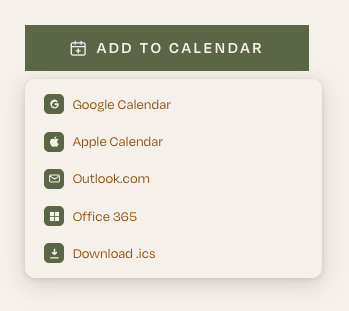
One tap, every calendar. Google, Apple, Outlook, Office 365, Yahoo, or a plain .ics file. Whatever the visitor uses, it just works.
The event arrives complete — title, time, location, description, and a link back to the page — so the reminder that fires later is useful, not a mystery.
It works anywhere, not just Events pages. A running club announcement on the homepage, a landing page for a fundraiser, a class listing.
The client can run it themselves. Adding the next event is filling in a form in the editor. No code, no dashboard, nothing to break.
What it looks like on a real site
Evergreen Café in Berkeley runs a steady calendar of events — vermouth tastings, pop-up dinners, artist receptions, a Sunday supper series. Their events page is exactly the kind of page where interest is high and follow-through is the whole game: someone reads about a Turkish meyhane dinner, thinks "that sounds incredible," and then has to remember it two weeks later.
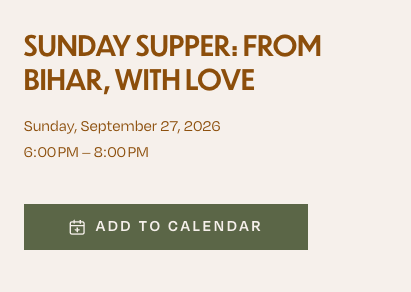
Each event on that page now carries an Add to Calendar button styled to match their site. A visitor who's interested taps it, picks their calendar, and the dinner — with the date, the address, and a link back to the event — is in their phone before they've finished scrolling. The reminder is set. Evergreen didn't have to send it.
How to use it alongside everything else you're already doing
We want to be clear: this isn't a replacement for the standard playbook. Keep sending your reminders. Keep the buzz going. Keep an FAQ handy. Add-to-calendar is the piece that makes all of that work better, because it catches people at the exact moment they're most interested — on the page, reading about the event — and gets the date into the one place they'll actually look.
If you run events on a Squarespace site, here's the simple version of what we'd tell you:
Turn on Squarespace's native export links on your Events page. It's free, and it's better than nothing.
Then put a real, one-tap Add to Calendar button on every page where an event lives — your Events page and anywhere you announce one. Make it impossible to miss.
Make sure the calendar entry it creates carries your description and a link back to the page, so the reminder can actually bring people back to RSVP or buy a ticket.
Keep your reminder emails going. They're now working on top of a reminder your guests already gave themselves.
Want it on your site?
CalButton is a one-time purchase (no subscription), it installs with a single line of code, and it doesn't track your visitors — the calendar link is built right in their browser. We built it for our own clients first, and it's the thing we reach for on every event site we make.
Try CalButton on your Squarespace site →
And if you'd rather have us set the whole events page up for you — button, reminders, the lot — that's what we do.